


Join 100K+ Web Creators Building with RunningWP!
Launch WordPress websites that stay online as long as you need
Create temporary or long-term WordPress websites without worrying about them disappearing after a few days. With the No Expiry option, your site stays active until you decide to remove it.
Get started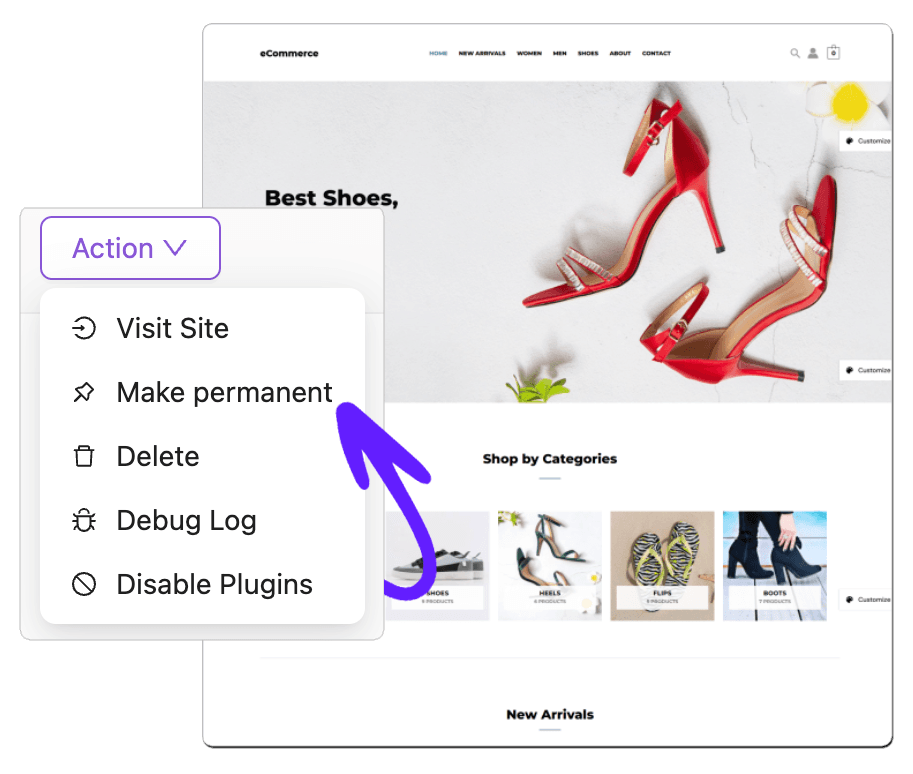
Keep your WordPress site alive without time limits
Most temporary WordPress sites expire after a short period. That works for quick tests, but not for serious projects. RunningWP’s No Expiry feature lets you keep your website online for as long as you need.
Whether you are building a client website, testing plugins, creating a demo, or preparing a launch, your site remains available without the pressure of a countdown.
Your projects should not disappear before you are done
Some websites take longer than expected. Clients need time to review. Content changes happen slowly. Teams need approval. Developers need testing environments that last longer than a few days.
With No Expiry, your website stays available throughout the entire process.
Give clients more time to review
Avoid rebuilding expired websites
Keep demos available for prospects
Preserve plugin and theme testing setups
Work at your own pace
Share live websites without worrying about deadlines
If you build websites for clients, No Expiry gives you a reliable place to show progress. Send a live link, collect feedback, make updates, and keep the same site online until the client approves it.
No more rushing because the preview site is about to expire.
Keep your test site ready whenever you need it
RunningWP is ideal for testing WordPress plugins, themes, templates, and custom code. With No Expiry, you can keep your setup available and return to it at any time.

Plugin testing
Theme testing
WooCommerce demos
Landing page experiments
Training websites
Internal development sites
Keep every change until you are ready to delete it
When a temporary site expires, your work can be lost. With no expiry, your changes stay in place. You can continue editing, refining, and improving your site whenever you want.
Without the no-expiry feature
With the no-expiry feature
Temporary when you need it, permanent when you want it
Not every website needs to last forever, but some do. RunningWP gives you the flexibility to decide which websites should expire and which ones should stay active.
Use standard temporary websites for quick testing, and choose No Expiry when the project needs more time.
Keep your websites online longer


No-Expiry Option
Your website remains active until you choose to remove it.
Perfect for Client Reviews
Send clients a live preview link without worrying about the site disappearing.
Great for Long-Term Testing
Keep plugin, theme, and template testing environments available whenever needed.
Protect Your Progress
Your edits, uploads, settings, and customizations stay in place.
Work Without Pressure
Build, edit, test, and review at your own pace.
Useful for Agencies
Keep multiple demo or preview sites available for different clients and projects.
Loved by people who need websites that stay online
Real testimonials by our users

Amy Smith
RunningWP’s No Expiry option is exactly what I needed. I created a site, shared it with my team, and we were able to keep working on it without worrying about it disappearing.

Danny Stein
For client projects, No Expiry is a lifesaver. I can send a live preview, collect feedback, and keep the same site online until the project is approved.

Diana Ho
We use No Expiry for demos and client previews. It saves us from recreating sites and gives our clients more time to review everything properly.
Frequently Asked Questions
Frequently asked questions about the No-Expiry features